 寻亦见北
寻亦见北 Clawdbot is a powerful AI assistant that can operate your computer and integrate with various services. This guide will walk you through the installation process step by step.
Prerequisites
- Node.js: JavaScript runtime environment
- npm: Package manager for Node.js
- Telegram Bot: For communication with the AI assistant
- A 24/7 Server: A server that remains operational around the clock
Step 1: Install Node.js and npm
sudo apt updatesudo apt install nodejs npmStep 2: Install Clawdbot
# Install Clawdbotnpm i -g clawdbot
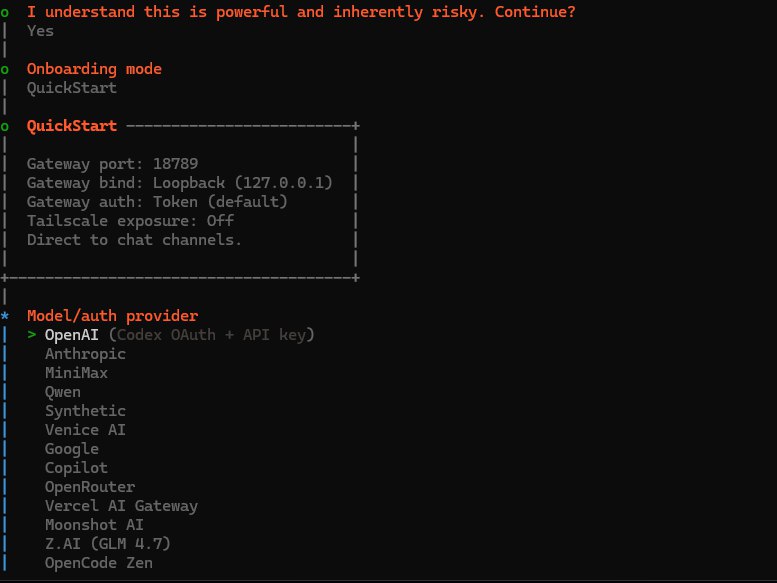
# Meet your assistantclawdbot onboard
Step 3: Configure Clawdbot
Select an appropriate model based on your API. I chose Qwen, which is free to use.
Step 4: Connect to Telegram Bot
- Search for BotFather in Telegram, look for the blue verified robot.
- Create a new bot.
- Copy the generated token.
- Connect the token to Clawdbot.
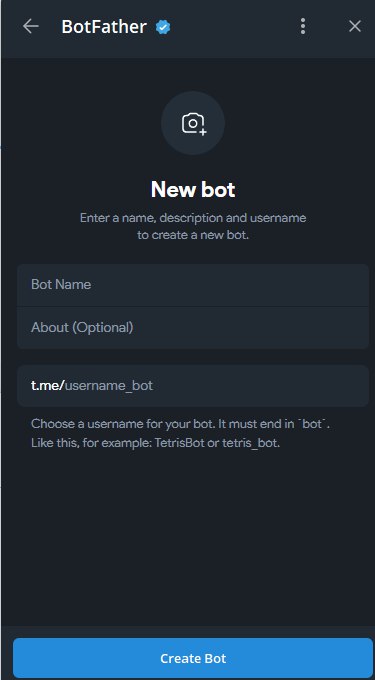
After completing the configuration as prompted, you can communicate with your AI assistant through Telegram.
Summary
Now you have successfully installed and configured Clawdbot, and set up communication via Telegram. Your AI assistant can now receive and respond to messages through Telegram and can operate your computer to perform various tasks.